《实战AI大模型》部署大模型-第05节:基于Ubuntu系统部署DeepSeek多模态生成模型
作者:冰河
星球:http://m6z.cn/6aeFbs
博客:https://binghe.site
文章汇总:https://binghe.site/md/all/all.html
源码获取地址:https://t.zsxq.com/0dhvFs5oR
大家好,我是冰河~~
在部署大模型章节的《第04节:基于Windows系统部署DeepSeek多模态生成模型》一文中,我们基于Windows系统部署了DeepSeek多模态生成模型,接下来,就基于Ubuntu系统部署DeepSeek多模态生成模型。
一、环境要求
基础环境最低要求说明:
| 环境名称 | 版本信息1 |
|---|---|
| Ubuntu | 22.04.4 LTS |
| Cuda | V12.4.105 |
| Python | 3.12 |
| NVIDIA Corporation | RTX 4090 |
二、更新基础软件包
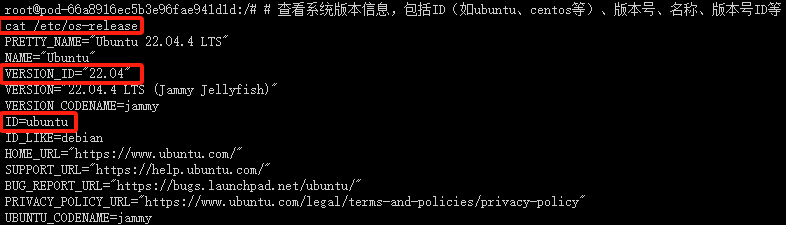
查看系统版本信息
# 查看系统版本信息,包括ID(如ubuntu、centos等)、版本号、名称、版本号ID等
cat /etc/os-release
配置 apt 国内源
# 更新软件包列表
apt-get update
这个命令用于更新本地软件包索引。它会从所有配置的源中检索最新的软件包列表信息,但不会安装或升级任何软件包。
随后安装vim编辑器。
# 安装 Vim 编辑器
apt-get install -y vim
这个命令用于安装 Vim 文本编辑器。-y 选项表示自动回答所有的提示为“是”,这样在安装过程中就不需要手动确认。Vim 是一个非常强大的文本编辑器,广泛用于编程和配置文件的编辑。
为了安全起见,先备份当前的 sources.list 文件之后,再进行修改:
# 备份现有的软件源列表
cp /etc/apt/sources.list /etc/apt/sources.list.bak
随后,编辑sources.list文件
# 编辑软件源列表文件
vim /etc/apt/sources.list
如下所示。
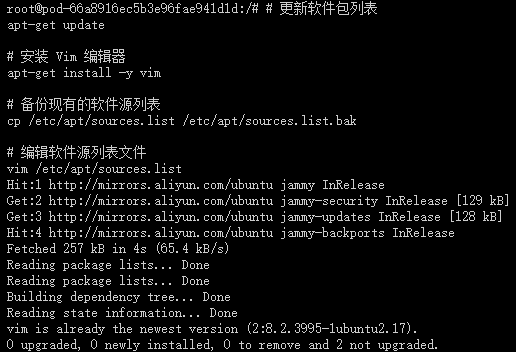
使用 Vim 编辑器打开 sources.list 文件,配置 apt 国内阿里源,编辑后的sources.list文件内容如下所示。
deb http://mirrors.aliyun.com/ubuntu/ jammy main restricted universe multiverse
deb-src http://mirrors.aliyun.com/ubuntu/ jammy main restricted universe multiverse
deb http://mirrors.aliyun.com/ubuntu/ jammy-security main restricted universe multiverse
deb-src http://mirrors.aliyun.com/ubuntu/ jammy-security main restricted universe multiverse
deb http://mirrors.aliyun.com/ubuntu/ jammy-updates main restricted universe multiverse
deb-src http://mirrors.aliyun.com/ubuntu/ jammy-updates main restricted universe multiverse
deb http://mirrors.aliyun.com/ubuntu/ jammy-backports main restricted universe multiverse
deb-src http://mirrors.aliyun.com/ubuntu/ jammy-backports main restricted universe multiverse
输入如下命令安装常用软件和工具。
# 更新源列表,输入以下命令:
apt-get update

# 更新系统软件包,输入以下命令:
apt-get upgrade

# 安装常用软件和工具,输入以下命令:
apt-get -y install vim wget git git-lfs unzip lsof net-tools gcc cmake build-essential
出现以下页面,说明国内apt源已替换成功,且能正常安装apt软件和工具
查看完整文章
加入冰河技术知识星球,解锁完整技术文章、小册、视频与完整代码